

Organic traffic vs. Paid traffic
You write your business plan, define your objectives and goals, register your corporation, register your domain name, and open a new website; now what? how will people discover your business on the Internet?
First, let’s define what web traffic is. Website traffic is represented by users who visit a website, and this traffic can be paid or unpaid. The unpaid traffic is called organic, which comes when a person searches using keywords using a search engine like Google or Bing, and your site pop-ups on the search engine result page and clicks on your page link. On the other hand, paid traffic is driven through paid search campaigns. To measure website traffic, you must have software that allows you to count traffic. Google Analytics is the most popular tool to help you measure traffic on a website.
Some metrics you need to know about traffic
These concepts were taken from support.gogole.com
- Sessions: A session is a group of user interactions with your website within a given time frame. A single user can open multiple sessions. Those sessions can occur on the same day or over several days, weeks, or months.
- Pageviews: A pageview (or pageview hit, page tracking hit) is a page being loaded (or reloaded) in a browser. A page view is a metric defined as the total number of pages viewed.
- User: a user is a visitor who has initiated a session on your website: the moment a person lands on any page of your site, they are identified as either a new or returning user.
Search engine page result anatomy (SERPs)
Let’s imagine you are an attorney who specializes in real estate. You offer various services, from preparing and reviewing lease and purchase and sale agreements, reviewing real estate deals, evictions, foreclosure defense, offering real estate closing title services, real estate arbitrage, litigation, etc. Also, your office is located in Miramar, Florida.
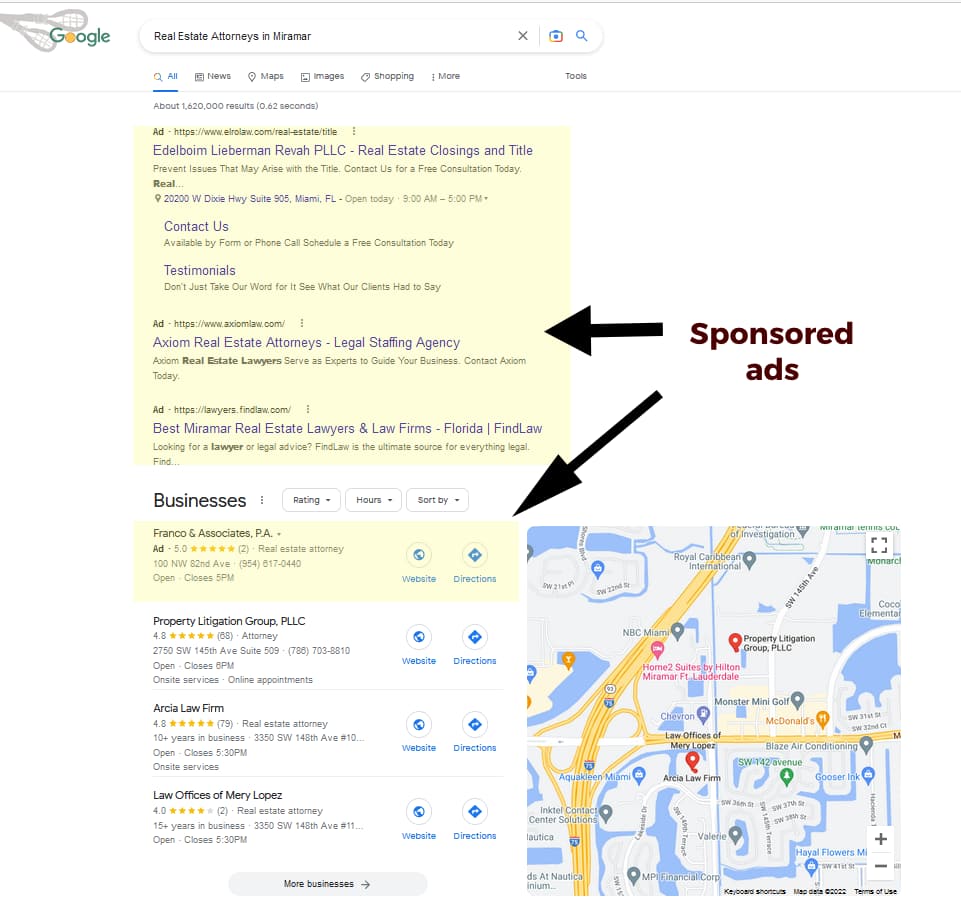
If you type on Google: Real Estate Attorneys in Miramar, the page result will show you something like the screen below. First, you will see sponsored links or Google ads, highlighted in yellow, then you will know a business list, highlighted in green, and on the right side, a map with the different business locations that match what you are looking for.
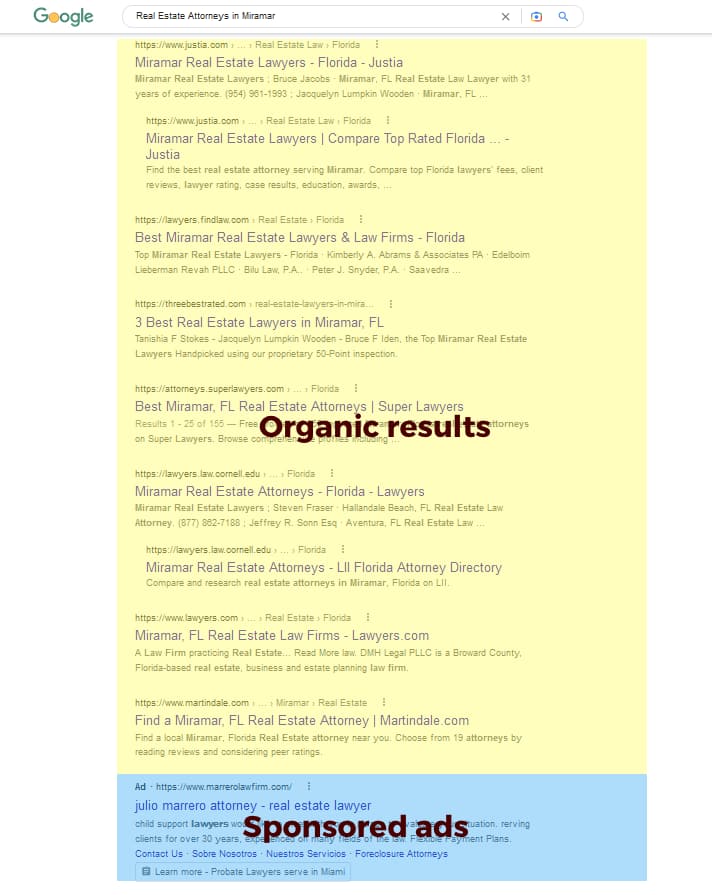
The second part of the screen will show more results, with many attorneys and related websites offering more information. Most of the information you find on the first screen are “sponsored” results. it means that they are paying to appear there. At the screen shown below, most of them, except for the one at the very bottom, are “organic results”.
How to drive organic traffic to my website?
You have to plan this before deploying your website, but if you have already deployed your website, no worries, you can still optimize it to start driving organic traffic to the website.
First, you need to start writing content tailored to your target audience and consider some basic search engine optimization (SEO) techniques. Like the following:
- Local search rankings. Following the example of a “Real Estate Attorney in Miramar.” Searches are looking for something very specific, and they don’t want an attorney in New York City or Texas; they are looking for an Attorney in Miramar, Florida. So you must open an account with Google My Business and provide information about your business, like office address, hours of operation, office photos, etc. Also, on the website, be clear, provide your business contact information, and specify wherever possible that you are located in Miramar, Florida.
- Keyword targeting and relevance. When you write your content, be descriptive, use keyword phrases that explain what you do, and try to target different phrases related to your brand and not associated with your brand but with the product you are trying to sell or the service you are trying to provide. A real Estate attorney is too broad, but if you specialize in foreclosure defense, it might be better to use a foreclosure defense real estate attorney. Also, you can add Miramar, Florida.
- SEO basis. It would help if you considered some of these elements when writing content for a web page.
- Plan your URL or web address structure, so if you are targeting foreclosure defense, it will be a good idea to add this phrase at the web address, for example, attorneymiramar.com/foreclousre-defend-help.
- A title tag appears at the top browser when a person navigates to a page; a reasonable title tag will help a visitor find your page and help with Google rankings; usually, a title tag should be under 60 characters.
- Headers are titles and sub-titles you use on a web page and are identified by the HTML code H1, H2, H3, etc. this gives relevance to a page, right your headers in the way they show relevance to the content you are writing about.
- Main Content, write your content using keyword phrases relevant to the topic you are discussing. As I mentioned, be descriptive and write at least 500 words or more for each page.
- Image Alt Text, this HTML help identify images for blind people and help Google determine what the image is about.
- Anchor Text / Internal links, you can link elements within the page and other pages within your website. Don’t use “click here” as an anchor text; use complete keyword phrases. For example, for more information about foreclosure defense is better than click here for more details.
- Page speed. Make sure your page is loading fast. You can measure your website speed at the Ping Dom website
- Responsive design. Make sure your website looks good on mobile devices and tablets but don’t forget about desktops. Nowadays, people browse websites using more mobile devices than before.
- HTTPS. Make sure your site uses a secure socket layer or digital certificate. This will provide some trust to potential visitors and improve your rankings on search engines.
- Plan your URL or web address structure, so if you are targeting foreclosure defense, it will be a good idea to add this phrase at the web address, for example, attorneymiramar.com/foreclousre-defend-help.
Many factors can affect your website rankings and visibility on search engines, and these are only a few. If you use WordPress as your CMS platform, I recommend using Yoast, an SEO plugin software that helps optimize your website.
